How to earn money online without investment, How to become healthy and strong , Current affairs and Latest govt jobs notifications
Wednesday, April 28, 2021
किशोर बालिका स्वास्थ्य
बड़ा परिवर्तन, बड़ी चुनौती -
आम तौर पर 10 से 16 वर्ष में एक मानव शरीर में यौवन शुरू होता है। यह एक बच्चे की परिपक्व होने की क्रमिक प्रक्रिया है। प्रत्येक व्यक्ति में समय-समय पर परिवर्तन होते रहते हैं। शरीर, व्यवहार, और जीवन शैली में परिवर्तन उनमें से कुछ हैं। इस प्रक्रिया के दौरान होने वाले परिवर्तन शरीर, हाथों, पैरों और कमर के आसपास दिखाई देते हैं।
शरीर के यौन अंग बड़े होते हैं और हार्मोन का उत्पादन शुरू होता है।
त्वचा का और अधिक विकास हो सकता है।
शरीर की देखभाल -
यहां शरीर की अच्छी तरह से देखभाल करने के लिए कुछ आवश्यक, सरल और बुनियादी बातें दी गई हैं:
एक वयस्क जब युवा होता है, तो उसे अधिक पसीना आना शुरू हो सकता है। इसलिए नियमित रूप से स्नान द्वारा त्वचा साफ और शरीर की गंध को दूर रखना आवश्यक है।
दंत क्षय (गुहाओं) से बचने के लिए व और तरो-ताजा साँस के लिए कम से कम दिन में दो बार दांत साफ करें।
तेल ग्रंथियों से अधिक सीबम (एक तैलय पदार्थ) का उत्पादन होता है जो मुहांसों के रूप में विकसित हो सकता है। मुहासे किशोरावस्था उम्र में बहुत ही सामान्य होते हैं, और उनसे पूरी तरह से बचने का कोई उपाय नहीं है। त्वचा को साफ रखना ही सबसे अच्छा समाधान है।
माता-पिता की सलाह लें-
किशोरावस्था मनुष्य के जीवन काल का एक ऐसा समय है जहां युवा और उनके माता-पिता के सामने कई समस्याएं आती हैं। कुछ बातों पर युवाओं को हमेशा ध्यान देना चाहिए, ये बातें हैं:
अपने परिवार की प्रशंसा करनी चाहिए।
माता-पिता के विचारों और विश्वास की कद्र होनी चाहिए।
माता-पिता की इच्छाओं का विशेष ध्यान रखना चाहिए।
मानसिक स्वास्थ्य
कई मानसिक स्वास्थ्य संबंधी समस्याएं देर से बचपन और किशोरावस्था में उभर सकती हैं, किंतु प्रयास यह होना चाहिए कि सामाजिक कौशल, समस्याएं सुलझाने के कौशल और आत्मविश्वास में बढ़ोत्तरी से इसका समाधान निकालना चाहिए। इस तरह के आचरण,विकार, चिंता, अवसाद के साथ ही यौन व्यवहार में भी परिवर्तन का कारक हो सकते हैं। इसलिए सामाजिक कौशल एवं आत्मविश्वास जैसे व्यवहार के रूप मानसिक स्वास्थ्य समस्याओं को रोकने में मदद कर सकते हैं।
गलत पदार्थों का उपयोग-
अवैध पदार्थ, तम्बाकू और शराब, स्वस्थ विकास की स्थिति के लिए बड़ी बाधा साबित हो सकते है। कानून के अलावा अन्य साथियों का दबाव और एक स्वस्थ तरीके से तनाव का प्रबंधन करने की क्षमता मानसिक स्वास्थ्य से जुड़ीं समस्याओं को कम करने में प्रभावी होते हैं।
अनैच्छिक घाव-
सड़क यातायात दुर्घटनाओं को कम करने, गंभीर चोट, दुर्घटनाग्रस्त किशोर और उनके स्वास्थ्य की सुरक्षा में महत्वपूर्ण हैं-लागू गति सीमा। यातायता के नियमों के पालन में गति सीमा दुर्घटना को कम करने में काफी प्रभावी है।
हिंसा-
जीवन कौशल बच्चों एवं किशोरों में सामाजिक विकास कार्यक्रमों के एक महत्वपूर्ण भाग के रुप में हिंसक व्यवहार को कम करने में महत्वपूर्ण है। इस कौशल के निर्माण में शिक्षक और माता पिता को सहायक बनाने की कोशिश की जा सकती है। जिससे समस्या को सुलझाने और अहिंसक होते हुए भी अनुशासित रखने में प्रभावी हुआ जा सकता है और इससे हिंसा में कमी आती है।
सीट बेल्ट को बढ़ावा देने के लिए कानून (और हेलमेट) का उपयोग और साथ में शिक्षा से अल्कोहल या अन्य पदार्थों का उपयोग ड्राइविंग में नहीं करने की जागरुकता लाना।
सुरक्षित और सस्ती सार्वजनिक परिवहन की उपलब्धता को बढ़ा कर ड्राइविंग करने के लिए विकल्प प्रदान करना
पर्यावरण सुरक्षित बनाना
पानी डूबने से बचने के लिए बच्चों और किशोरों को शिक्षित करना।
पोषाहारपूर्व के वर्षों में कुपोषण जीवन काल भर में व्यापक, प्रतिकूल स्वास्थ्य और सामाजिक परिणामों के लिए जिम्मेदार रहा है। इससे अच्छे बचपन में रुकावट आती है। भोजन के उपयोग में सुधार से बचपन से किशोरावस्था आने की स्थिति में शारीरिक विकास संतुलित होता है। रक्ताल्पता किशोरियों में महत्वपूर्ण पोषक तत्वों के कम होने की समस्याओं में से एक है।
यौन और प्रजनन स्वास्थ्य-
यौन और प्रजनन स्वास्थ्य के बारे में किशोरों को शिक्षित करने के उद्देश्य से कार्यक्रमों का आयोजन किया जा सकता है, जिससे कि वे अपने जीवन में 'क्या सीखा है' को लागू करने के लिप्रेरित हो सकें। साथ ही ऐसा करने के उद्देश्य को कार्यक्रम के साथ जोड़ा जा सकता है। इससे आसानी से किशोरों और स्वास्थ्य कर्मियों को इन मामलों में जागरुक किया जा सकता है। किशोरावस्था में यौन बलात्कार के खिलाफ विभिन्न स्तरों पर लड़ा जाना चाहिए।
एचआईवी-
एचआईवी संक्रमण से युवा लोगों के सामने खड़े जोखिम को यौन कैरियर की शुरुआती उम्र के साथ जोड़ा जाता है। यौन साथी के चयन और यौन व्यवहार करने के लिए सही समय, कंडोम उपयोग की जानकारी एवं एचआईवी संक्रमण रोकथाम की शिक्षा युवा लोगों के लिए अनिवार्य की जानी चाहिए।
स्रोत: RCH II
Friday, May 31, 2019
Free Web Designing Course Notes for Learn More
Introduction
Well Come To My glorious learning pages....
The module starts here with, inevitably, the more theoretical aspects of the Internet and the Web. We begin by explaining hypertext before moving on to the most elaborate hypermedia system, the Web, and the ideas of client-server computing that allow us to use it.
Hypertext
Hypertext systems allow for non-sequential, or non-linear, reading. This is the underlying idea of a hypertext system. The result is a multidimensional document that can be read by following different paths through it. In this section we will look into the application of hypertext in computer systems, mainly the World Wide Web hypertext system.
The main use of hypertext is in information retrieval applications. The ease of linking different pieces (fragments) of information is the important aspect of hypertext information retrieval. The information can be of various media: it may be fragments of textual documents, structured data from databases, or list of terms and their definitions. Any of these, or a mixture thereof, can make up the contents of a hypertext document.
Therefore, in a hypertext system it is possible to:
- link with a term that represents aspects of the content of a document
- connect two related documents
- relate a term to a fragment containing its definition and use
- link two related terms
To do:
Read about networked hypertext and hypermedia in your textbooks.
A hypertext document contains links referring to other parts of the document, or even to whole other documents. A hypertext document does not have to be read serially; the fragments of information can be accessed directly via the links contained in the document.
The links embedded in a document are known as hyperlinks. When selected, these hyperlinks allow for the portion of the document linked to by the hyperlink to be displayed. This allows the reader to jump to another part of the same page, another page in the same document, or another document. By following a series of hyperlinks, the reader can follow their own path through the document.
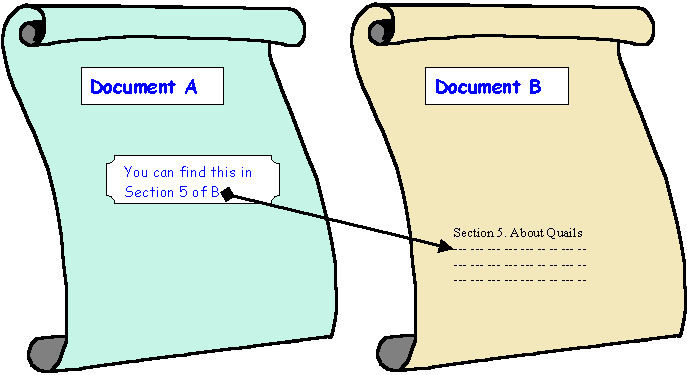
A computerised hypertext system implements this idea by including anchors and links in documents, which are usually represented by files. An anchor is a fragment of information which links to another document or portion thereof. It is the visual representation of a link. A link is the actual reference (or "pointer") to the other document. For example, in the diagram below, the fragment of Document A containing 'You can find this in Section 5 of B' is an anchor from which there is a link to the relevant section in Document B.
Take care not to confuse anchor or link. A link is a pointer to another piece of information within the same document or in another document; often you cannot see how that link is implemented (it may be a hidden URL or some other programmed mechanism). An anchor is a fragment of information which the user interacts with in order to access the link. For instance, in a Web Browser the phrase "Click here to return to the previous page" is the anchor which the user interacts with — it contains the link to the previous page.
A hyperlink must have unambiguous reference to the document: this is usually information on the document's location (where in some file space or network it is) and the mechanism to access it (called the communication protocol). In Unit 2 you will meet HTML anchors and how the referenced documents are identified and located with URLs.
The links embedded in a document are known as hyperlinks. When selected, these hyperlinks allow for the portion of the document linked to by the hyperlink to be displayed. This allows the reader to jump to another part of the same page, another page in the same document, or another document. By following a series of hyperlinks, the reader can follow their own path through the document.
A computerised hypertext system implements this idea by including anchors and links in documents, which are usually represented by files. An anchor is a fragment of information which links to another document or portion thereof. It is the visual representation of a link. A link is the actual reference (or "pointer") to the other document. For example, in the diagram below, the fragment of Document A containing 'You can find this in Section 5 of B' is an anchor from which there is a link to the relevant section in Document B.

Take care not to confuse anchor or link. A link is a pointer to another piece of information within the same document or in another document; often you cannot see how that link is implemented (it may be a hidden URL or some other programmed mechanism). An anchor is a fragment of information which the user interacts with in order to access the link. For instance, in a Web Browser the phrase "Click here to return to the previous page" is the anchor which the user interacts with — it contains the link to the previous page.
A hyperlink must have unambiguous reference to the document: this is usually information on the document's location (where in some file space or network it is) and the mechanism to access it (called the communication protocol). In Unit 2 you will meet HTML anchors and how the referenced documents are identified and located with URLs.
A hypertext document allow links to portions of the document occurring before the link's anchor. This allows the reader to loop to portions of the document that they have already seen.
The table of contents in a book is a collection of anchors with explicit links to the internal parts of the book. Its bibliography is another collection of links but it refers to external information. To refer to the internal parts of the book is simple: the reader merely turns to the appropriate page, usually identified by page number. However, referring to the external information given in a bibliography requires a more complicated effort of searching.
In computer-based hypertext documents, the mechanism to follow a link (the jump) is automatic. Jumping to an external link (another document) is as easy as jumping to an internal link within the same document. As long as the link is sufficiently specified with the name and the exact location of the linked document, the user can directly access the linked document with a simple click on the anchor.
The table of contents in a book is a collection of anchors with explicit links to the internal parts of the book. Its bibliography is another collection of links but it refers to external information. To refer to the internal parts of the book is simple: the reader merely turns to the appropriate page, usually identified by page number. However, referring to the external information given in a bibliography requires a more complicated effort of searching.
In computer-based hypertext documents, the mechanism to follow a link (the jump) is automatic. Jumping to an external link (another document) is as easy as jumping to an internal link within the same document. As long as the link is sufficiently specified with the name and the exact location of the linked document, the user can directly access the linked document with a simple click on the anchor.
A series of successive jumps constructs a chained path through a series of documents. There is no limit as to the number of jumps, therefore the size of the chain is not constrained.
There may be more than one link in a page and the reader is free to choose any of these links to follow. The path a reader takes will then be different from the path of another reader. Each sequence of jumps forms a different path to fragments of the overall information in the hypertext document. Generally, there is no rigid order to read the information in.
There are two different but complementary purposes of chaining documents via links:
Travelling through hypertext documents usually poses no technical difficulty. However, the reader might experience practical difficulties in retrieving a particular piece of information from a document with numerous alternative links.
There may be more than one link in a page and the reader is free to choose any of these links to follow. The path a reader takes will then be different from the path of another reader. Each sequence of jumps forms a different path to fragments of the overall information in the hypertext document. Generally, there is no rigid order to read the information in.
There are two different but complementary purposes of chaining documents via links:
- Focusing: At each jump along the path, the user can narrow the scope of the search until the fragment containing the topic of their interest is reached.
- Broadening: Multiple outgoing links from a document allow the user to broaden their search. This is useful when the user does not have a precise idea of what is being searched for, or wishes to conduct a broad search in a certain domain.
Just as the reader is free to choose which links and jumps a path through a hypertext document is to follow, it is possible for a user to return to a point previously visited. In other words, loops may exist. A path may even return to the original (home) document. Hence, the structure does not necessarily follow a linear pattern; instead, the documents are connected together in a graph / mesh defined by the links.
This critical property shifts the burden of devising suitable exploration paths from the designer of a hypertext document to the user. This changes the way information is stored and retrieved. Instead of searching directly for information, hypertext allows browsing for information. However, the mesh of information creates difficulty in navigating through the hypertext document.
One of the original purposes for hypertext was the storage and management of textual documents. As computer and telecommunications technology has improved, the capabilities of hypertext systems have been extended to include any digitised media, such as sound and images.
This means that music and videos can be accessed via hyperlinks. This addition of multimedia to hypertext is known as Hypermedia. A combination of text, graphics, video or sound can now easily be interlinked in hypermedia document to offer a rich, often interactive, environment.
The process of preparing hypertext documents or, quite often, of converting a flat (linear) collection of documents into hypertext, is referred to as authoring.
Often an initial collection of documents has to be reorganised by splitting up the original documents into multiple sub-documents. Then links between these new documents must be constructed. Authors of hypertext documents are not only responsible for the content of these documents, but must link documents together, create paths through them, and build references that point to external documents associated to them.
Conceptually, related information is ultimately presented as a single, unique collection of hypertext documents. The remarkable aspect of hypertext or hypermedia documents that distinguishes them from other document types is that hypertext is 'shaped' by the user as he or she navigates the hypertext's network of link. Each sequence of links is a possible exploration path and each chosen sequence forms a single conceptual document for the user.
Often an initial collection of documents has to be reorganised by splitting up the original documents into multiple sub-documents. Then links between these new documents must be constructed. Authors of hypertext documents are not only responsible for the content of these documents, but must link documents together, create paths through them, and build references that point to external documents associated to them.
Conceptually, related information is ultimately presented as a single, unique collection of hypertext documents. The remarkable aspect of hypertext or hypermedia documents that distinguishes them from other document types is that hypertext is 'shaped' by the user as he or she navigates the hypertext's network of link. Each sequence of links is a possible exploration path and each chosen sequence forms a single conceptual document for the user.
Table 1.1.
| Getting lost in 'hyperspace' | The easy linking of different fragments of information, crucial for browsing, can produce hypertext documents that are very difficult to use. The user may become disoriented when they do not know where they are in the document, and where he can go to. This problem of navigating a hypertext network is also known as being 'lost in hyperspace'. There are ways to minimise the risks of being lost in such a large information space. |
| Return path | The user simply backtracks through all the previous documents, link by link, until they reach the one they want to revisit. Alternatively, if the user remembers the reference of the required document, it may be selected from a list of the most recent documents explored. |
| Home page | The starting fragment in a path is known as the home page. This home page is usually a well-defined document that contains the first links to a certain path. It helps to remind the user the path he has taken before and may even serve as a starting point to another path. |
| Overview diagrams | This is the explicit display of the graph / mesh network of documents and links. Many websites have an overview site-map showing the paths the user may take to access certain information from the site. |
| Guided tours | These are suggested paths arranged by the document's authors. Its purpose is to assist the user in the exploration of information in hypertext document. Tour documents form a logical path sequence by using simple 'next-document' or 'last-document' anchors. |
| Direct jump | This allows the user to move directly to a portion of a hypertext document. The user has to know the name and location of the portion to directly jump to it. In a Web browser, the URL address of the website is typed in and the requested page is retrieved and displayed to the user. |
| Content-based retrieval | Some documents may offer a search facility. Browsing for information through the search facility can help narrow the information space to the domain of interest. However, most current search facilities are restricted to textual information only. |
The Ultimate Hypermedia System: The World Wide Web
The World Wide Web (Web) is a hypermedia system. It has largely achieved the goal of Tim Berners-Lee, its British inventor, of a universal information space. Thanks to the global reach of the Internet, there is potentially universal access to an enormous volume of documents over the Internet. (Of course, in many developing countries, access is poor, which raises issues of disenfranchisement and disempowerment.) Many organisations make publicly available collections of hypermedia documents as part of either their marketing programme, customer service or global operations. Computer suppliers, for example, now publish very detailed specifications of their products via the Web.
Web servers and clients may be located at any part of the world and connected to each other by telecommunication links. If the Web is in some sense a digital library, it is one with no single geographical location. When it comes to commerce, distance begins to lose importance. As long as a supplier can provide goods or services where they are required, the location of the vendor and the consumer will not matter. (This gives rise to issues about jurisdiction for taxes, consumer laws, legality of product, etc.) This absence of distance is supported by the ease with which Web documents may be located world-wide; the mechanism is straightforward thanks to the way the location of such 'resources' are identified by a Uniform Resource Location (URL). The URL format unambiguously specifies locations of 'documents' on the Web. This location mechanism allows the actual implementation of geography-independent feature of the Web.
Generally speaking, there is no central authority controlling the Web, although fully qualified domain names are subject to controlled allocation, and Internet Service Providers may be subject to the laws of the countries in which they operate. Furthermore, the World-Wide Web Consortium (W3C), headed by Tim Berners-Lee at the Massachusetts Institute of Technology, is influencing — and to a large degree controlling — how technologies are deployed on the Web. The W3C specifies HTML and XML, but others bodies, such as the European Computer Manufacturers Association (ECMA), have standardised other Web technologies, such as what we mostly call JavaScript. JavaScript is a programming language originally developed by Netscape.
Anyone with the appropriate knowledge, and with access to server space, can create a Web document. These Web documents can make reference to any other document. Moreover, a user does not require specific, proprietary software on their computer platform to access the Web, with many Web browsers being free software. While browsers can access and display the information on the Web, not all of them can supply the user with the interactive portions of the Web pages. For example, if Java applets are prohibited or a browser does not support JavaScript, interactivity with the Web document will be limited; some information may even be missing if that information required the presence of these interactive components.
The implications are easy to predict. With different browsers supporting different features, and with the navigation difficulties associated with hypertext's mesh / graph connections, chaos might ensue. However, even the most inexperienced users currently cope and the Web, and it is becoming both a universal world of information, and a universal place for doing business.
Dynamic pages can respond interactively to user input. It is possible to have portions of a hypertext document be produced by a programme as the document is requested. In this way, Web pages are increasingly being used as a front end to databases.
This allows the user to fill out a query and send it off for processing by the hypertext document. The server queries the database using the user's information and returns the output as HTML. To allow data to be sent in such a way to and from Web servers, a standard called the Common Gateway Interface (CGI) has been created. The difference between dynamic Web pages and non-dynamic (so called 'static') Web pages is transparent to the browser and user.
It is also possible to embed programmes inside HTML. When the browser loads such a page, the code is immediately executed. This mechanism supports remote transactions for the commercial aspect of the Web
Web servers and clients may be located at any part of the world and connected to each other by telecommunication links. If the Web is in some sense a digital library, it is one with no single geographical location. When it comes to commerce, distance begins to lose importance. As long as a supplier can provide goods or services where they are required, the location of the vendor and the consumer will not matter. (This gives rise to issues about jurisdiction for taxes, consumer laws, legality of product, etc.) This absence of distance is supported by the ease with which Web documents may be located world-wide; the mechanism is straightforward thanks to the way the location of such 'resources' are identified by a Uniform Resource Location (URL). The URL format unambiguously specifies locations of 'documents' on the Web. This location mechanism allows the actual implementation of geography-independent feature of the Web.
Generally speaking, there is no central authority controlling the Web, although fully qualified domain names are subject to controlled allocation, and Internet Service Providers may be subject to the laws of the countries in which they operate. Furthermore, the World-Wide Web Consortium (W3C), headed by Tim Berners-Lee at the Massachusetts Institute of Technology, is influencing — and to a large degree controlling — how technologies are deployed on the Web. The W3C specifies HTML and XML, but others bodies, such as the European Computer Manufacturers Association (ECMA), have standardised other Web technologies, such as what we mostly call JavaScript. JavaScript is a programming language originally developed by Netscape.
Anyone with the appropriate knowledge, and with access to server space, can create a Web document. These Web documents can make reference to any other document. Moreover, a user does not require specific, proprietary software on their computer platform to access the Web, with many Web browsers being free software. While browsers can access and display the information on the Web, not all of them can supply the user with the interactive portions of the Web pages. For example, if Java applets are prohibited or a browser does not support JavaScript, interactivity with the Web document will be limited; some information may even be missing if that information required the presence of these interactive components.
The implications are easy to predict. With different browsers supporting different features, and with the navigation difficulties associated with hypertext's mesh / graph connections, chaos might ensue. However, even the most inexperienced users currently cope and the Web, and it is becoming both a universal world of information, and a universal place for doing business.
Dynamic pages can respond interactively to user input. It is possible to have portions of a hypertext document be produced by a programme as the document is requested. In this way, Web pages are increasingly being used as a front end to databases.
This allows the user to fill out a query and send it off for processing by the hypertext document. The server queries the database using the user's information and returns the output as HTML. To allow data to be sent in such a way to and from Web servers, a standard called the Common Gateway Interface (CGI) has been created. The difference between dynamic Web pages and non-dynamic (so called 'static') Web pages is transparent to the browser and user.
It is also possible to embed programmes inside HTML. When the browser loads such a page, the code is immediately executed. This mechanism supports remote transactions for the commercial aspect of the Web
To Do:
Read about the World-Wide Web in your textbooks.
Here we briefly summarise some of the terms you will need in the module; they will be studied to varying extents in later chapters.
A network protocol is a standard way of regulating data transmission between computers. Just as diplomats adhere to protocols — rules of behavior — when in foreign lands, network communications do the same. They have to obey agreed rules if they are to communicate and 'get on with each other'. After many years of both public and private research and development, two network protocols are now dominant: TCP (Transaction Control Protocol) and IP (Internet Protocol), together known as TCP/IP. (These were actually unlikely protocols to be so widely accepted, as faster, standardized protocols had been agreed upon, but none had the same robustness and extensibility as TCP/IP.)
Very often protocols were implemented without any formal acceptance and, because they worked most of the time, they became standards by default. Although TCP/IP is an accepted, de facto standard, work on Internet protocols continue in order to improve communication quality and support the continued growth of the Internet. There is no dictating authority for the Internet. Without a controlling authority, interim proposals about protocol changes are made by groups of interested individuals and then opened up for discussion. Documents containing the various proposed standards are published as Requests For Comment documents (RFCs). You may see references to a specific RFC as the best description of a protocol!
An URL is needed to locate any resources on the Web. It is an address format that specifies how and where to find a document. The general format is as follows, where the various items in italics must be substituted with part of a real URL, or omitted altogether.
port is the TCP port to connect to; this is an entry point to software on the server; an optional part of a URL
path is a relative file path from the server's document root; the server will start looking for a file in a specific directory and paths are relative to this
file_name is the name of the file to be browsed, e.g. welcome
file_extension is one of a number of suffixes which, by convention and operating system setup, indicate the type of data contained within the file, e.g. htm,html, txt.
http://machine_name:port/path/file_name.file_extensionmachine_name is either an IP address, for example 137.234.33.89, or a Fully Qualified Domain Name (also known as a DNS name, because Domain Name Servers map between Domain Names and IP addresses), for example, www.apple.com
port is the TCP port to connect to; this is an entry point to software on the server; an optional part of a URL
path is a relative file path from the server's document root; the server will start looking for a file in a specific directory and paths are relative to this
file_name is the name of the file to be browsed, e.g. welcome
file_extension is one of a number of suffixes which, by convention and operating system setup, indicate the type of data contained within the file, e.g. htm,html, txt.
This language provides the format for specifying simple logical structure and links in a hypertext document. As a markup language, special formatting commands are placed in the text describing how the final version should appear. These formatted documents are interpreted by a Web browser which uses the HTML code to format the page being displayed. Several units in this module deal with HTML extensively. Although most professionals use special authoring tools to write HTML documents and to manage sites, developers of e-commerce sites and applications need to know the nitty-gritty detail of HTML, and this is what you will study.
HTTP is a network protocol used to retrieve documents from a variety of machines in a minimum of time. It was invented by Tim Berners-Lee to support a project in developing a distributed hypertext system. Distributed hypertext requires the retrieval of documents from many different machines. File Transfer Protocol (FTP), which predates the Web, would be too slow for this purpose as it is a connection-oriented protocol that requires a permanent connection to a server, thus requiring a connection-maintenance overhead when accessing different machines.
Therefore, to support browsing, HTTP has the following characteristics:
HTTP is not mandatory for distributed hypertext; there are other techniques and protocols that can be used to access or transfer information. However, like TCP/IP and HTML it is ubiquitous, and so enables investment to develop e-commerce.
Therefore, to support browsing, HTTP has the following characteristics:
- connection-less: a connection is established only for the period of transfer, and the connection need not be maintained after thereafter;
- stateless: the server has no 'history' of client visits (although the implementation of cookies overcomes this);
- comprehensive addressing: diverse files on any HTTP server world-wide can be referenced via URLs
- diverse data: using extensible MIME-types (see later), HTTP servers can supply information of every possible data types;
- rapid: allows request-response cycles of less than 100 milliseconds
HTTP is not mandatory for distributed hypertext; there are other techniques and protocols that can be used to access or transfer information. However, like TCP/IP and HTML it is ubiquitous, and so enables investment to develop e-commerce.
The Web began as a tool to share knowledge and has successfully evolved into a general communications mechanism. With the support of transactions and synchronous communications, the Web has application in many different fields.
A primary use is the dissemination of knowledge, which takes many forms. For example, chat rooms and bulletin boards are integral to interactive discussion of all kinds of subjects. Frequently Asked Questions (FAQs), published on Web sites, offer answers to users' questions on how to do certain kinds of tasks. The variety of information that can be pulled out of the Web is wide-ranging.
Education includes a variation of the dissemination of knowledge. Open- or distance-learning programmes spearhead this aspect of the Web. Basically, any kind of demonstration on how to carry out certain tasks can be considered education. For example, a user can learn how to create a Web page from the numerous websites publishing such instructions.
With the possibilities of online trading, business transactions are carried out on the Web. The user supplies their order and credit card details so as to buy products advertised on the Web. The Selling module would cover this subject area in depth.
A primary use is the dissemination of knowledge, which takes many forms. For example, chat rooms and bulletin boards are integral to interactive discussion of all kinds of subjects. Frequently Asked Questions (FAQs), published on Web sites, offer answers to users' questions on how to do certain kinds of tasks. The variety of information that can be pulled out of the Web is wide-ranging.
Education includes a variation of the dissemination of knowledge. Open- or distance-learning programmes spearhead this aspect of the Web. Basically, any kind of demonstration on how to carry out certain tasks can be considered education. For example, a user can learn how to create a Web page from the numerous websites publishing such instructions.
With the possibilities of online trading, business transactions are carried out on the Web. The user supplies their order and credit card details so as to buy products advertised on the Web. The Selling module would cover this subject area in depth.
The Web as a vast digital library is becoming what is known as a 'Global Information Structure'. It will have a profound effect on how we live, work and play. We shall now look into a few of the social implications of the Web as a digital library and a marketplace.
The hypermedia concept includes not only text and illustrations, but also music, animation, digital movies, video games and computer software. This diversity changes the form of literacy required when using the Web. The literacy needed when listening to music and watching a movie is different from that used when reading a book. Less literacy may be required with innovative ways of using this digital library. For example, software that reads text aloud can assist people with visual handicaps.
Editors and publishers employing traditional methods of publishing have little to gain from this type of publishing. As digital works can be copied at low costs, stored in almost no space and transported instantly anywhere in the world, writers can be their own publishers. Therefore, the works published are of indeterminate quality and value. Web publishing may provide no evaluation of work published.
An article may perhaps interest a group of specialists in that field. With the Web, an average reader may browse through the article according to their degree of interest in the field. He or she may not want to be burdened with an additional flood of technicalities, or perhaps would navigate further to extract more in-depth information to supplement a deeper interest in the field.
The ease of copying digital works causes difficulties in protecting copyrights. It may be tempting to make illegal copies rather than finding the rightful owners and paying them a fee. On the other hand, the non-issue of distance and the 24-hour, 365-day activity on the Web means that much can be easily bought through on-line shops. Consumers may come from distant areas or different time zones. With the Web, this market place is open at all times and can serve a very large global region. New technology even allows computational agents to staff the market place rather than people. Therefore, businesses are not constrained by distance or time.
Despite the irrelevance of distance, an electronic marketplace may be attractive as it goes to the consumers instead of them physically moving to the business environment. Its sense of place is created as an illusion for the benefit of the consumers.
We shall proceed with an analysis of hypertext documents.
Links can be created to associate related subjects. Therefore the information given can be extensive and wide. The combination of two related subject areas is known as knowledge additivity.
Let's say you want to find out how to tailor a shirt using a sewing machine. You would probably look in a book on tailoring a shirt and another on using a sewing machine. The information read would then be linked together in your brain. However, with the hypertext concept, this knowledge additivity would be simpler with association links. You can just continue clicking to read on both subject areas within the perceived single document.
There are difficulties with working with hypertext, and hence also in providing or obtaining goods or services.
Discussions and answers can be found at the end of the chapter
Exercise 2
Write down your ideas about the possible drawbacks of hypertext using the following headings. If you like, go on-line to discuss these with colleagues before writing them down.- Navigation Difficulties
- No Main Catalogues
- Network Overload
- Link Fossilisation
Discussions and answers can be found at the end of the chapter
When you are surfing the Web, you are using a Web browser. When you go to a website for documents, the site delivers them using software called the Web server. The browser is considered to be a client in the relationship with the server as it is requesting information services from the server. This is just one particular example of the client-server model of computing.
The client-server model has been defined as:
A software partitioning paradigm in which a distributed system is split between one or more server tasks which accept requests, according to some protocol, from (distributed) client tasks, asking for information or action. There may be either one centralized server or several distributed ones. This model allows clients and servers to be placed independently on nodes in a network.
Client-server computing is mainly about the client computer possessing its own computing power. In the days of mainframes, all the processing power took place on central computers. The client 'terminals' were little more than a television that could send and receive characters. When microprocessors became available, it was possible to make the terminals more powerful so that they could handle some of the processing. Over time this has meant that mainframes have been replaced by smaller server machines and terminals have been replaced by more powerful client workstations.
The client-server model provides a good division of processing power, since the server primarily provides information to the client which is responsible for interpreting and displaying it. This means that servers do not have to be powerful machines, allowing more people to become service providers.
A more important characteristic is that because the client-server model provides for significant processing power at the (remote) client end, the operator of the client system has considerable autonomous power in contributing to the enterprise of which he or she is a part. This means that local decisions can be made, possibly faster than if they were made remotely, and action taken.
You may hear client-server computing being talked about as a modern computing 'paradigm'. Other than being part of a sales pitch, this is likely to mean that the model has made a significant impact on, and change to, the way we design and use computer systems. In particular, it is the current model for distributed business systems, and fits nicely into the emerging Web.
A software partitioning paradigm in which a distributed system is split between one or more server tasks which accept requests, according to some protocol, from (distributed) client tasks, asking for information or action. There may be either one centralized server or several distributed ones. This model allows clients and servers to be placed independently on nodes in a network.
Client-server computing is mainly about the client computer possessing its own computing power. In the days of mainframes, all the processing power took place on central computers. The client 'terminals' were little more than a television that could send and receive characters. When microprocessors became available, it was possible to make the terminals more powerful so that they could handle some of the processing. Over time this has meant that mainframes have been replaced by smaller server machines and terminals have been replaced by more powerful client workstations.
The client-server model provides a good division of processing power, since the server primarily provides information to the client which is responsible for interpreting and displaying it. This means that servers do not have to be powerful machines, allowing more people to become service providers.
A more important characteristic is that because the client-server model provides for significant processing power at the (remote) client end, the operator of the client system has considerable autonomous power in contributing to the enterprise of which he or she is a part. This means that local decisions can be made, possibly faster than if they were made remotely, and action taken.
You may hear client-server computing being talked about as a modern computing 'paradigm'. Other than being part of a sales pitch, this is likely to mean that the model has made a significant impact on, and change to, the way we design and use computer systems. In particular, it is the current model for distributed business systems, and fits nicely into the emerging Web.
In the context of the Web, users run client programmes (i.e. Web browsers) which provide the following functionality:
Server programmes carry out the following:
One of the advantages of the client server model is that one server can handle many clients. The teller in the bank (server) handles many customers (clients). Also, you can use lots of different servers to get the service you need. (That is there are a lot of tellers, and for that matter, bank branches and cash machines.)
For any website, say the University of Cape Town Computer Science website or the University's Vula site , think about the following questions and write down your answers:
Discussions and answers can be found at the end of the chapter
- They allow the user to send a request for information to the server.
- They format the request so that the server can understand it.
- They format the response from the server in a way that the user can read it.
- They receive a request from a client and process the request.
- They respond by sending the requested information back to the client.
Exercise 3
The client-server model applies to a lot of things outside of computers. Imagine going to a bank to withdraw some money? Who is the client and who is the server? Clearly, you are the client and the bank is the server.One of the advantages of the client server model is that one server can handle many clients. The teller in the bank (server) handles many customers (clients). Also, you can use lots of different servers to get the service you need. (That is there are a lot of tellers, and for that matter, bank branches and cash machines.)
For any website, say the University of Cape Town Computer Science website or the University's Vula site , think about the following questions and write down your answers:
- Are there multiple clients?
- Who are these clients?
- Are there multiple servers?
- Why would there be multiple servers?
Information is passed from the server to the browser. This information may be in the form of HTML documents, GIF files, Excel spreadsheets, movies — just about any digital content.
Information can also be passed from the browser to the server. When you click on a hyperlink you are sending information to the server, and when you fill in an online form, you are usually sending information to the server.
In addition to passing information backwards and forwards, some processing can also be done in the browser. For instance, you might have a simple Web page that calculates the overall cost of a loan once the initial value of the loan, the interest rate and the length of the loan have been entered.
But where does the processing take place? Does the server process the information and generate the result, or is it the client that processes the information? If the client does the processing, then this is a client-side application; if it is the server, it is a server-side application.
In the loan example above, the client has the information (the principle, rate and time). It could send this information to the server to process the information, generate the result and send it back to the client. Alternatively, the server could send a programme to the client that will carry out the processing. In the latter case, since the client has all the information and the programme is pretty small, it is probably better to run the application on the client side.
Of course, there is also a problem of who has the information. If the server has a database, and the client wants to query it, then there are two possibilities. The server could send the database and the querying programme to the client to process it or the server could process it and simply send the result. In this case, it would probably be better to do the processing on the server side.
To summarize, where the processing is undertaken largely depends on where the information is, but also depends on the processing loads of the machines as well as the size of the programme being run.
Discussions and answers can be found at the end of the chapter
Information can also be passed from the browser to the server. When you click on a hyperlink you are sending information to the server, and when you fill in an online form, you are usually sending information to the server.
In addition to passing information backwards and forwards, some processing can also be done in the browser. For instance, you might have a simple Web page that calculates the overall cost of a loan once the initial value of the loan, the interest rate and the length of the loan have been entered.
But where does the processing take place? Does the server process the information and generate the result, or is it the client that processes the information? If the client does the processing, then this is a client-side application; if it is the server, it is a server-side application.
In the loan example above, the client has the information (the principle, rate and time). It could send this information to the server to process the information, generate the result and send it back to the client. Alternatively, the server could send a programme to the client that will carry out the processing. In the latter case, since the client has all the information and the programme is pretty small, it is probably better to run the application on the client side.
Of course, there is also a problem of who has the information. If the server has a database, and the client wants to query it, then there are two possibilities. The server could send the database and the querying programme to the client to process it or the server could process it and simply send the result. In this case, it would probably be better to do the processing on the server side.
To summarize, where the processing is undertaken largely depends on where the information is, but also depends on the processing loads of the machines as well as the size of the programme being run.
Exercise 4
On the East Med. Trading Co. website, they would like to display to the user the number of pages that he or she has visited at that site. Think about the following questions and make a note of your answers.- What data is needed?
- Where is the data stored?
- Should this be a client or a server side application
A browser receives binary data from the server which it has to cope with. How does it know if the binary data is an HTML document, a GIF picture file or something entirely different? Even if it does know what kind of document it is, how does it process it? The answer to this is MIME types.
MIME types — Multipurpose Internet Mail Extensions — were created to identify the differing types of possible email attachments. The MIME types have been extended to include new multimedia types as they have been introduced, and are now used with a variety of protocols including HTTP. When information is sent to a browser, a MIME header identifies the file type of the document. Attaching a MIME type to a file allows the browser to process the file's contents correctly without the browser having to guess at the data type from the file's extension. This is important, since while MS-DOS files require a three letter extension to identify a file type (and Windows XP uses a similar file extension system), not all operating systems do this.
This MIME header information has the following format:
type is one of several general types such as: text, audio, image, video, application etc.
subtype is a more specific designation. This is a large and ever expanding category.
Some examples of MIME headers are
MIME types — Multipurpose Internet Mail Extensions — were created to identify the differing types of possible email attachments. The MIME types have been extended to include new multimedia types as they have been introduced, and are now used with a variety of protocols including HTTP. When information is sent to a browser, a MIME header identifies the file type of the document. Attaching a MIME type to a file allows the browser to process the file's contents correctly without the browser having to guess at the data type from the file's extension. This is important, since while MS-DOS files require a three letter extension to identify a file type (and Windows XP uses a similar file extension system), not all operating systems do this.
This MIME header information has the following format:
Content-type: type/subtypewhere
type is one of several general types such as: text, audio, image, video, application etc.
subtype is a more specific designation. This is a large and ever expanding category.
Some examples of MIME headers are
text/HTML video/MPEG image/GIF
Mime types are processed as follows.
Let us use Microsoft Excel charts as an example (although this document type is obviously not new) and write down all the options to be considered on how this could be achieved.
Discussions and answers can be found at the end of the chapter
- Somehow the HTTP server must decide what type a file is. The server administrator can provide this information by instructing the server to map file extensions to certain file types. The server administrator must therefore supply a list of all the different file extensions for the files found on the server, along with the equivalent MIME types for each of these file extensions.
- The client browser must also be configured to know how to deal with these different types. Most browsers have been preconfigured, but they sometimes need to be updated to deal with new file types. On Netscape Navigator 7.1, for instance, you use the Edit/Preferences... /Navigator/Helper Applications menu.
- View it in the browser. (Files such a GIFs, JPGs etc. can all be handled by the browser)
- Use a plug in. (Plug-ins are special pieces of code that software companies distribute to allow browsers to cope with new file formats.)
- Launch another application on your computer that can process the format.
- If all else fails, the file can be saved to disk until a suitable programme is found.
Exercise 5
Suppose that there is a new document type that needs to be displayed on the client's computer and that you need to introduce a new MIME type for this document type.Let us use Microsoft Excel charts as an example (although this document type is obviously not new) and write down all the options to be considered on how this could be achieved.
Discussions and answers can be found at the end of the chapter
Subscribe to:
Posts (Atom)
Trump's response is key as Argentina's Falklands demands get louder
With Argentina's President Milei promising "winds of change" over the Falklands, will Donald Trump shift his stance on British...
-
Following the Texas floods some Democrats have warned about the "consequences" of President Trump's cuts to the federal workfo...
-
When asked about giving Maxwell clemency, the president said he was allowed to do so, but had "not thought" about it. from BBC N...
-
Trump sought to remove Cook from the central bank's board in August, the first time a president has tried to fire a Fed governor. from...